FAQ
1. How do I get started with the Relayer API?
- Refer to our tutorial here: Tutorial
- API document: https://relayer-api-mainnet.horizenlabs.io/docs
- Mainnet API URL: https://relayer-api-mainnet.horizenlabs.io/api/v1
2. What are the chain ID mappings?
Chain ID mappings can be found here: Supported Networks
3. What are common issues why proof verification would fail and how do I resolve this?
- Most of the common errors are due to incorrect structure and formatting required for the proof type that a user is trying to submit. Check that your code is properly submitting the correct requested field based on one of the supported proof types and versions.
- All proof submissions require the following fields:
proofData,proofType, andvkRegistered. WithinproofDatathe fieldsproofandvkare also required. - For requirements for each proof type, refer here: Supported Proofs.
- If
vkRegisteredis set totruein the request, make sure the verification key is registered; otherwise there will be an error for using an unregistered verification key hash. In order to check that the verification key is registered, use the/register-vkendpoint on Relayer. If the verification key is registered, it will return with the verification key hash that can then be used in the submit proof request.
4. How do I check if my attestation is published?
The chain ID needs to be defined when calling the submit-proof endpoint. After the attestation is published, the job status will be updated to “Aggregated”. The job status and the aggregation details can be found from the /job-status endpoint.
- Option 1, verify via smart contract: https://docs.zkverify.io/overview/getting-started/smart-contract
- Option 2, use the block explorer and enter in the aggregation details in the verifyProofAggregation method on the smart contract. Example on Horizen L3 Base: https://horizen-explorer-testnet.appchain.base.org/address/0x201B6ba8EA862d83AAA03CFbaC962890c7a4d195?tab=read_write_proxy
- Example: Required values can be found from the
/job-statusendpoint
curl -X GET "https://relayer-api-testnet.horizenlabs.io/api/v1/job-status/{apiKey}/6fb39e27-ab7c-11f0-a9f5-2ed83da2b73c" \
  -H "Content-Type: application/json"
{
  "jobId": "6fb39e27-ab7c-11f0-a9f5-2ed83da2b73c",
  "status": "Aggregated",
  "statusId": 6,
  "proofType": "groth16",
  "chainId": 845320009,
  "createdAt": "2025-10-17T17:12:19.000Z",
  "updatedAt": "2025-10-17T17:13:04.000Z",
  "txHash": "0xf5c81f4896c980224ae8c7f6852f9b27c5869da896141782065f5c71388b06dd",
  "blockHash": "0xb8fe72aef6b4ac0cff5702ced59eb8e2d147c57c1267d3d7b89eb1bcd944e120",
  "aggregationId": 18555,
  "statement": "0x6ba0adac9febf7a8cdbef31b5e1799af9557784b41a7f46af94ab9dbecf37081",
  "aggregationDetails": {
    "receipt": "0x24f5a00876d55fc142846e17b41540fc9aa4c223d53fdd8f5b77f79627d2adc2",
    "receiptBlockHash": "0x90435b1c565e832010c684670ae8d17c520820b469abb4a6d0ced566e18c63ce",
    "root": "0x24f5a00876d55fc142846e17b41540fc9aa4c223d53fdd8f5b77f79627d2adc2",
    "leaf": "0x6ba0adac9febf7a8cdbef31b5e1799af9557784b41a7f46af94ab9dbecf37081",
    "leafIndex": 7,
    "numberOfLeaves": 8,
    "merkleProof": [
      "0xc59014864835a71d88385ffe9f6321626818c19df1fa1c2b52a6ab5a62ca4467",
      "0x8612679ddadc54ee066d1eaed079dcfc5a02c383f5e0782a6b85d765d13554a5",
      "0x8f41f883c53b1e1b7cb1ba58450374f538a534ecfbdc2092e8c5158d1d9ec279"
    ]
  }
}
On the attestation contract, use the verifyProofAggregation method. It will return true if the attestation was successful:
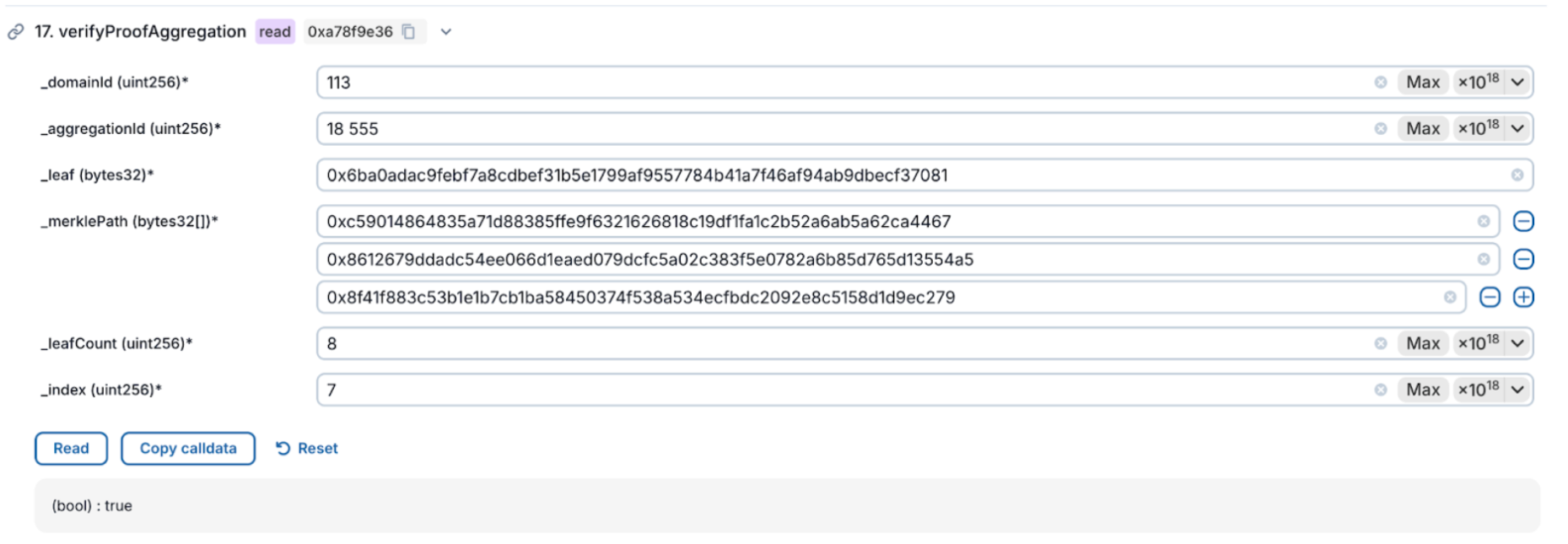
5. How long does it take for an aggregation to finalize?
Aggregation timing depends on the chain you’re targeting. Each chain collects a batch of proofs, and an aggregation happens either when the batch fills up or when a set amount of time passes, whichever comes first. While the exact timing can vary based on how many proofs are submitted, aggregations for each chain will occur at most at the intervals listed below:
| Network | Chain | Time |
|---|---|---|
| Mainnet | Base | 2 mins |
6. How do I register my verification key?
First, ensure the type of proof that you are submitting adheres to the proper format required (i.e. Check that you are not submitting ultrahonk proofs when your circuit code is for ultraplonk). The Relayer API has a /register-vk endpoint and should be used to register your verification key.
7. How do I get an API key?
- Mainnet: Sign up here https://relayer.horizenlabs.io
8. How do I check transactions on zKVerify?
- For transactions submitted on mainnet, you can use the transaction hash in the block explorer here: https://zkverify.subscan.io